Pennsylvania Driver's License Issue Date: Where ISS Is and What the Fields Mean
The issue date on a Pennsylvania driver's license is labeled ISS and appears on the front of the card, typically in the lower portion under the photo. If a form is asking for your license issue date and you have a Pennsylvania card, ISS is what you want. Here's what every field and abbreviation on your Pennsylvania license means.
Table Of Contents
- 1. Where to find the issue date on a Pennsylvania driver's license
- 2. Date fields on a Pennsylvania driver's license
- 3. What does DD mean on a Pennsylvania driver's license?
- 4. Restrictions on a Pennsylvania driver's license
- 5. Pennsylvania REAL ID: what the gold star means
- 6. Pennsylvania license classes
- 7. How to renew a Pennsylvania driver's license
- 8. How to find your original Pennsylvania licensing date
- 9. Common mistakes when entering your Pennsylvania license issue date
Where to find the issue date on a Pennsylvania driver's license
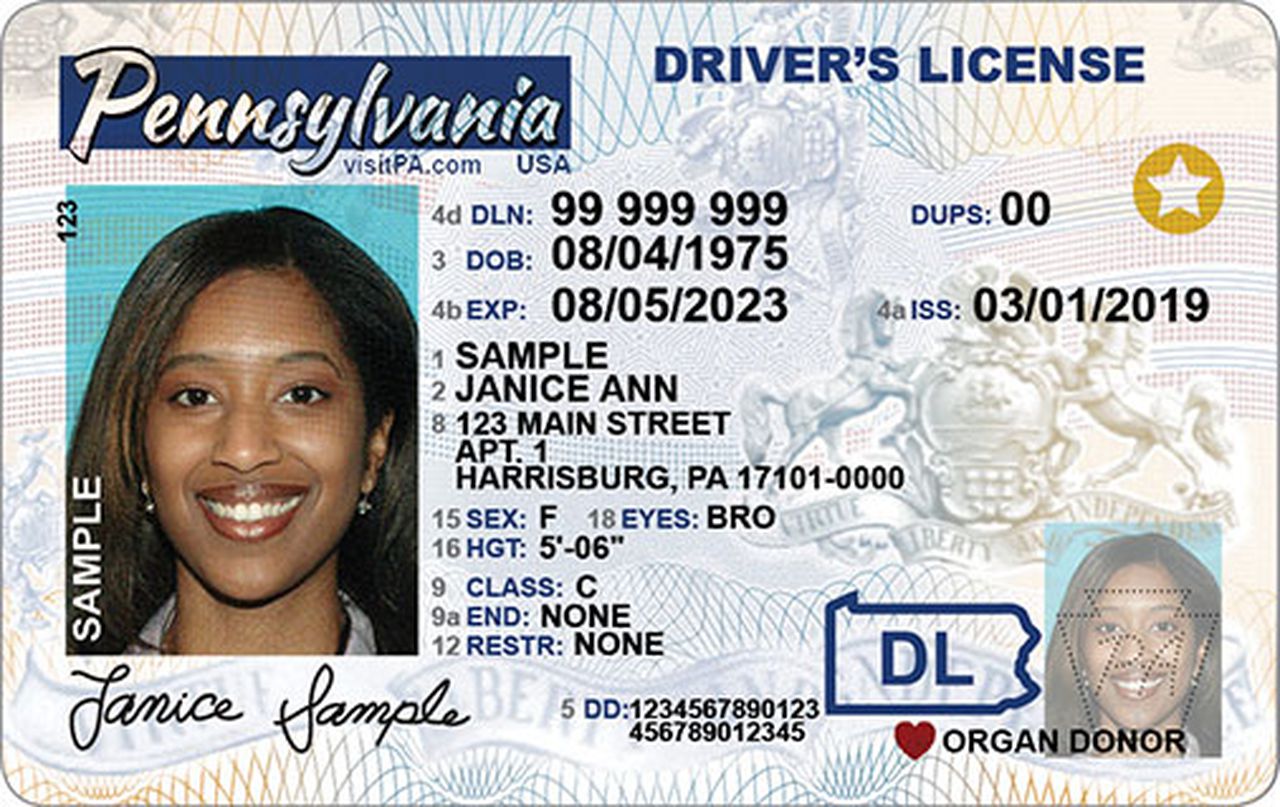
On the current Pennsylvania license design issued by PennDOT (Pennsylvania Department of Transportation), the issue date is labeled ISS and printed in the lower section of the card. ISS stands for Issue Date and marks when your current card was printed and issued to you.
Only 1% of California drivers answer all 3 correctly
Think you know the rules? Most licensed drivers miss at least one.
At 60 mph on a dry California freeway, what is the recommended minimum following distance?
ISS is not the same as your date of birth or your expiration date. If you've renewed your Pennsylvania license, the ISS date on your current card reflects the renewal date. Your license number stays the same through renewals, but ISS changes each time a new card is printed.
Preparing for your DMV test?
Download our free iOS app — 1,164+ practice questions in 11 languages, flashcards, and offline study!

Date fields on a Pennsylvania driver's license
Pennsylvania licenses print three date fields, all of which can look similar at a glance:
- ISS: Issue date. The date your current card was issued by PennDOT.
- DOB: Date of birth. Your birthdate, used for identity and age verification.
- EXP: Expiration date. Pennsylvania driver's licenses are valid for 4 years for most adult drivers.
When filling out a form that asks for your "driver's license issue date," use ISS. When it asks for "date of birth," use DOB. They're different fields on the same card.
What does DD mean on a Pennsylvania driver's license?
DD stands for Document Discriminator, a unique serial number for your specific physical card. It's different from your license number and changes every time a new card is printed, even if your license number stays the same.
Banks, car rental agencies, and background check services use the DD to verify the card is authentic. If a form asks for a "document number" separate from your license number, it's usually the DD.
Restrictions on a Pennsylvania driver's license
The restrictions field on a Pennsylvania license is typically labeled RSTR or Restrictions. If it's empty or shows None, your license has no restrictions. Common Pennsylvania restriction codes:
- A: Corrective lenses required while driving
- B: Daylight driving only
- C: No freeway or limited-access highway driving
- E: Automatic transmission only
- F: Outside mirror required on driver's side
- X: Requires prosthetic aid
Pennsylvania adds restrictions to your license based on medical reviews, driving evaluations, or license exam conditions. Driving in violation of a restriction is a traffic offense.
Pennsylvania REAL ID: what the gold star means
Pennsylvania issues both standard and REAL ID-compliant driver's licenses. A REAL ID-compliant Pennsylvania license has a gold star in the upper right corner. From May 7, 2025, you need a REAL ID or another federally accepted document to board domestic flights and access certain federal buildings.
A standard Pennsylvania license without the star works for driving and most everyday identification but not for domestic air travel. To get a Pennsylvania REAL ID, visit a PennDOT Driver License Center in person with: a birth certificate or U.S. passport, your Social Security card or a document showing your SSN, and two documents showing your current Pennsylvania address.
Pennsylvania license classes
Pennsylvania uses the following license classes:
- Class C: Standard non-commercial license for most cars, vans, and light trucks
- Class A: Commercial license for tractor-trailers and large combination vehicles
- Class B: Commercial license for large single vehicles like buses and heavy trucks
- Class M: Motorcycle license (standalone or combined with Class C)
How to renew a Pennsylvania driver's license
PennDOT offers several renewal options:
- Online: Available at the PennDOT Driver and Vehicle Services website for most standard renewals. Eligible drivers must not need a new photo and must have a current address on file.
- By mail: PennDOT sends renewal notices by mail before your license expires, and some drivers can renew by mailing the notice back with payment.
- In person: Required for REAL ID upgrades, new photos, address changes, and CDL transactions. Pennsylvania has Driver License Centers across the state.
- ISS is the label for the issue date on your Pennsylvania license. It shows when the PennDOT issued your current card.
- ISS is not your date of birth (DOB) and not your expiration date (EXP): enter the date next to ISS when a form asks for "license issue date."
- If you renewed your license, the ISS date on your current card reflects the renewal, not your original license date.
- The DD field (Document Discriminator) is a card serial number, not a date: do not enter it as an issue date.
How to find your original Pennsylvania licensing date
The ISS date on your current card shows when that card was issued, not when you first became a licensed Pennsylvania driver. Your original licensing date is in your official driving record. You can order a copy through the PennDOT website. Records are typically available for 3 to 10 years depending on the record type requested.
Common mistakes when entering your Pennsylvania license issue date
- Use the date next to ISS when any form asks for your "license issue date" or "date issued"
- Check the date format the form expects: some want MM/DD/YYYY, others want YYYY-MM-DD
- If you have a renewed license, use the ISS date on your current card, not the date you first got a license
- Keep a photo of your license on your phone for quick reference when filling out online forms
- Renew your license before the EXP date: many employers and landlords reject a license within 60 days of expiry
- Update your address within 30 days of moving to keep your license record current
- Don't enter your DOB (date of birth) when a form asks for the issue date: they are completely different fields
- Don't enter your EXP (expiration date) as the issue date: expiration is when the license ends, not when it was issued
- Don't use the issue date from an old expired license if you have a current one
- Don't enter the DD (Document Discriminator) number as your issue date: it's a card serial number, not a date
- Don't guess the date if you can't read your license clearly: order a replacement to avoid entering incorrect information
- Don't assume the issue date is the same as your birthday: they are unrelated