Alabama Driver's License Issue Date: Where to Find ISS and What the Fields Mean
Online forms, rental car counters, and background check systems often ask for your driver's license issue date. On an Alabama license, the field is labeled ISS and appears in the middle of the card, next to your photo. Here's exactly what that means and how to read every field on your card.
Table Of Contents
- 1. Where to find the issue date on an Alabama driver's license
- 2. What do DOB and EXP mean on an Alabama driver's license?
- 3. Restrictions on an Alabama driver's license
- 4. Alabama REAL ID: the star on your license
- 5. How to renew your Alabama driver's license
- 6. What if you need your original licensing date?
- 7. Alabama license issue dates vs other states
- 8. Common mistakes when entering your Alabama license issue date
Where to find the issue date on an Alabama driver's license
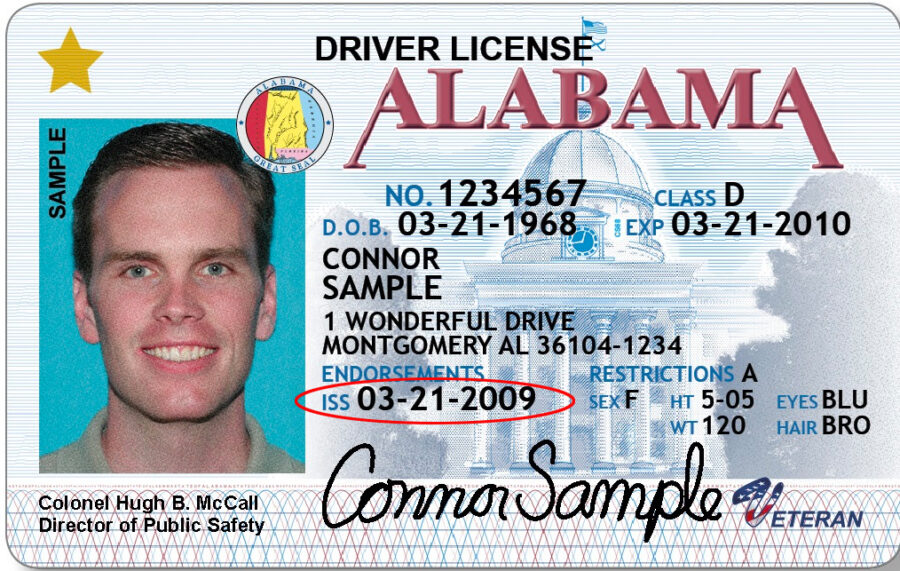
On the current Alabama REAL ID design, the issue date is labeled ISS and printed in the center of the card, adjacent to your photo. In a sample Alabama license, ISS might read March 21, 2009. That's the date the Alabama Law Enforcement Agency (ALEA) issued your current card, not the date you first became a licensed driver.
Only 1% of California drivers answer all 3 correctly
Think you know the rules? Most licensed drivers miss at least one.
At 60 mph on a dry California freeway, what is the recommended minimum following distance?
ISS stands for Issue Date. Each time you renew your Alabama license, the ISS date resets to the new issuance date. Your license number stays the same across renewals, but ISS changes with every new card.
Preparing for your DMV test?
Download our free iOS app — 1,164+ practice questions in 11 languages, flashcards, and offline study!

What do DOB and EXP mean on an Alabama driver's license?
Alabama licenses print three date fields:
- ISS: Issue date. When your current card was printed.
- DOB: Date of birth (also written as D.O.B on older cards). Your birthdate, used for identity and age verification.
- EXP: Expiration date. The date your current license expires. Alabama licenses are generally valid for 4 years for most drivers, though the exact term can vary.
When a form asks for your "driver's license issue date," it wants ISS. When it asks for your "date of birth," it wants DOB. They are on the same card but are different fields with different dates.
Restrictions on an Alabama driver's license
Unlike some states that abbreviate the restrictions field as RSTR, Alabama spells it out as "Restrictions" on the card. If the field is empty, your license has no restrictions. Common Alabama restriction codes:
- A: Corrective lenses required while driving
- B: Daylight driving only
- C: No freeway or highway driving
- D: Speed restriction (specified separately)
- E: Automatic transmission only
- J: Outside mirror on driver's side required
If you have restrictions you're unsure about, the Alabama Law Enforcement Agency website at alea.gov lists all codes and their requirements. Driving in violation of a restriction on your license is treated similarly to driving without a license for enforcement purposes.
Alabama REAL ID: the star on your license
Alabama issues both REAL ID-compliant and standard licenses. A REAL ID-compliant Alabama license has a gold star in the upper right corner. From May 7, 2025, you need a REAL ID or another federally accepted document to board a domestic flight or enter federal buildings.
A standard Alabama license without the star works for driving and state-level ID purposes but can't be used for domestic air travel. If your card doesn't have the star and you want REAL ID compliance, you'll need to visit an ALEA Driver License Office in person with additional documentation: proof of identity, Social Security number, and two documents showing your Alabama address.
How to renew your Alabama driver's license
Alabama driver's licenses are valid for 4 years for most drivers. Renewal options depend on your situation:
- Online: Alabama offers online renewal for eligible drivers through the ALEA website. You must have a current, non-expired license and no significant changes to your record.
- By mail: Available for certain drivers, including military personnel stationed out of state.
- In person: Required if you need a new photo, are upgrading to REAL ID, or have a changed address or name.
Alabama doesn't charge late fees for expired licenses in most cases, but driving with an expired license is a traffic violation. Renew before your EXP date, not after.
What if you need your original licensing date?
The ISS field shows when your current card was issued, not when you first got licensed in Alabama. Insurance companies, employers, and CDL programs sometimes need your original licensing date to verify how long you've been a licensed driver.
That information is in your full driving record, not on the physical card. You can request a certified copy of your Alabama driving record through the ALEA website. It shows your original license date, all renewals, endorsements, restrictions, and your violation and accident history.
- ISS is the label for the issue date on your Alabama license. It shows when the ALEA issued your current card.
- ISS is not your date of birth (DOB) and not your expiration date (EXP): enter the date next to ISS when a form asks for "license issue date."
- If you renewed your license, the ISS date on your current card reflects the renewal, not your original license date.
- The DD field (Document Discriminator) is a card serial number, not a date: do not enter it as an issue date.
Alabama license issue dates vs other states
Most states put the issue date in a slightly different location and use varying abbreviations. Alabama and California both use ISS. New York spells out "Issued" in full. Georgia doesn't print the issue date on the front at all: it's encoded in the barcode on the back.
If you're looking at a license from another state and can't find the issue date, look for ISS, ISSUED, or the date that isn't your birthdate or expiration date. Our Alaska, Arizona, and other state guides cover the differences.
Common mistakes when entering your Alabama license issue date
- Use the date next to ISS when any form asks for your "license issue date" or "date issued"
- Check the date format the form expects: some want MM/DD/YYYY, others want YYYY-MM-DD
- If you have a renewed license, use the ISS date on your current card, not the date you first got a license
- Keep a photo of your license on your phone for quick reference when filling out online forms
- Renew your license before the EXP date: many employers and landlords reject a license within 60 days of expiry
- Update your address within 30 days of moving to keep your license record current
- Don't enter your DOB (date of birth) when a form asks for the issue date: they are completely different fields
- Don't enter your EXP (expiration date) as the issue date: expiration is when the license ends, not when it was issued
- Don't use the issue date from an old expired license if you have a current one
- Don't enter the DD (Document Discriminator) number as your issue date: it's a card serial number, not a date
- Don't guess the date if you can't read your license clearly: order a replacement to avoid entering incorrect information
- Don't assume the issue date is the same as your birthday: they are unrelated