Georgia Driver's License Issue Date: Why It's in the Barcode, Not on the Front
Georgia is one of the few states that doesn't print the issue date on the front of the driver's license. If you're looking for ISS on your Georgia card and can't find it, that's why. The issue date is stored in the barcode on the back under the field name DBD. Here's how to find it and what every field on a Georgia license means.
Table Of Contents
- 1. Georgia doesn't print the issue date on the front of the card
- 2. How to find the issue date on a Georgia driver's license
- 3. Date fields on a Georgia driver's license
- 4. What does DD mean on a Georgia driver's license?
- 5. What does the gold star on a Georgia driver's license mean?
- 6. License class and restrictions on Georgia licenses
- 7. How to renew a Georgia driver's license
- 8. Georgia vs other states: the issue date difference
- 9. Common mistakes when entering your Georgia license issue date
Georgia doesn't print the issue date on the front of the card
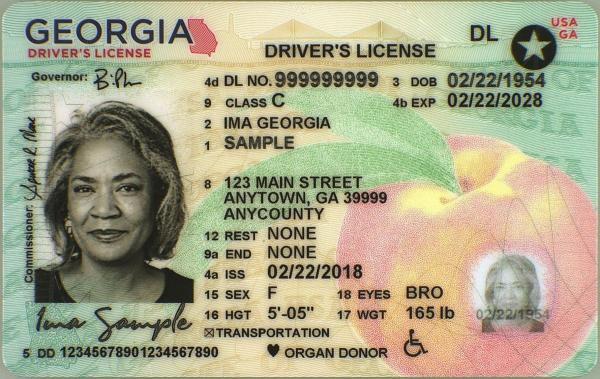
Unlike most states, Georgia's current driver's license design doesn't display the issue date as a visible field on the front. The front of the card shows your photo, name, address, date of birth, expiration date, license number, license class, and restrictions. Issue date is not printed there.
Only 1% of California drivers answer all 3 correctly
Think you know the rules? Most licensed drivers miss at least one.
At 60 mph on a dry California freeway, what is the recommended minimum following distance?
The issue date is encoded in the PDF417 barcode on the back of the card under the AAMVA field code DBD (Date of Birth/Document issue Date). When a scanner reads a Georgia license, DBD is the field that returns the issue date.
Preparing for your DMV test?
Download our free iOS app — 1,164+ practice questions in 11 languages, flashcards, and offline study!

How to find the issue date on a Georgia driver's license
If a form asks for your license issue date and you have a Georgia card, you have a few options:
- Scan the barcode. Any app that reads PDF417 barcodes will show the DBD field. Smartphone barcode scanner apps can read a Georgia license in a few seconds. The DBD value in the barcode is your issue date.
- Check your driving record. The Georgia Department of Driver Services (DDS) issues driving records that include license issuance dates. You can request one online at dds.georgia.gov.
- Contact the Georgia DDS directly. If you need the date for a legal or employment purpose, the DDS customer service team can provide it.
If the form doesn't accept "not printed on card," the barcode scan is the quickest solution.
Date fields on a Georgia driver's license
Georgia licenses print two date fields on the front:
- DOB: Date of birth. Printed on the card for identity and age verification.
- EXP: Expiration date. Georgia licenses are generally valid for 8 years for drivers between 25 and 64. Drivers under 25 or 65 and older may have shorter validity periods.
The issue date (ISS or DBD) is not on the front. It's in the barcode.
What does DD mean on a Georgia driver's license?
DD stands for Document Discriminator, a serial number unique to each physical card. The DD changes every time a new card is printed, even if your license number stays the same. It's different from your license number and is used by banks, rental companies, and verification systems as a secondary check.
On Georgia licenses, the DD appears in small text on the front of the card. It can be confused with the license number, so read the field labels carefully.
What does the gold star on a Georgia driver's license mean?
Georgia issues both standard and REAL ID-compliant licenses. A REAL ID-compliant Georgia license has a gold star in the upper right corner. From May 7, 2025, a REAL ID or another accepted federal document is required to board domestic flights and enter certain federal facilities.
A Georgia standard license without the star works for driving and most everyday ID purposes but not for domestic air travel. To get a REAL ID, you must visit a Georgia DDS office in person with documentation: proof of identity, Social Security number, and two documents showing your Georgia address.
License class and restrictions on Georgia licenses
Georgia licenses show a Class field (typically C for standard non-commercial vehicles, A or B for commercial) and a Restrictions field. Common Georgia restriction codes:
- A: Corrective lenses required
- B: Daylight driving only
- C: No highway or expressway driving
- E: Automatic transmission only
- P: Passenger vehicles only for CDL holders
How to renew a Georgia driver's license
Georgia offers online renewal for eligible drivers through the Georgia DDS website. Online renewal is available if your address is current and you don't need a new photo. In-person renewal is required if you're upgrading to a REAL ID, if your address has changed, or if your photo needs updating.
Georgia has a network of Customer Service Centers (CSCs) and DDS Express locations for in-person services. DDS Express locations handle routine transactions with shorter wait times than full CSCs.
- Georgia does not print the issue date on the front of the card. It is encoded as DBD in the PDF417 barcode on the back.
- To find your issue date, use a barcode scanner app or ask the DDS office to look it up from your record.
- The front shows DOB (date of birth) and EXP (expiration): neither of those is the issue date.
- Online forms that ask for your issue date and you have a Georgia license: contact the requesting company and ask if they can accept a DMV record lookup instead.
Georgia vs other states: the issue date difference
Most states (California, Texas, Arizona, Alabama, Michigan, and others) print ISS visibly on the front of the card. Georgia is one of a small number of states that encodes it only in the barcode. If you're used to looking for ISS on the front of a license and you're looking at a Georgia card, it's not there: look at the barcode with a scanner instead.
Common mistakes when entering your Georgia license issue date
- Use the date next to DBD (barcode) when any form asks for your "license issue date" or "date issued"
- Check the date format the form expects: some want MM/DD/YYYY, others want YYYY-MM-DD
- If you have a renewed license, use the DBD (barcode) date on your current card, not the date you first got a license
- Keep a photo of your license on your phone for quick reference when filling out online forms
- Renew your license before the EXP date: many employers and landlords reject a license within 60 days of expiry
- Update your address within 30 days of moving to keep your license record current
- Don't enter your DOB (date of birth) when a form asks for the issue date: they are completely different fields
- Don't enter your EXP (expiration date) as the issue date: expiration is when the license ends, not when it was issued
- Don't use the issue date from an old expired license if you have a current one
- Don't enter the DD (Document Discriminator) number as your issue date: it's a card serial number, not a date
- Don't guess the date if you can't read your license clearly: order a replacement to avoid entering incorrect information
- Don't assume the issue date is the same as your birthday: they are unrelated