Michigan Driver's License Issue Date: Where to Find ISS, DD, and What They Mean
Michigan driver's licenses print the issue date in the lower portion of the card under the label ISS. If a form is asking for your license issue date and you're looking at a Michigan license, ISS is the field you want. Here's how to read every date and abbreviation on the card, and what each one means.
Table Of Contents
- 1. Where to find the issue date on a Michigan driver's license
- 2. Michigan license types: Standard, REAL ID, and Enhanced
- 3. What does DD mean on a Michigan driver's license?
- 4. What does RSTR mean on a Michigan driver's license?
- 5. Date fields on a Michigan driver's license
- 6. How to renew your Michigan driver's license
- 7. How to find your original Michigan licensing date
- 8. Common mistakes when entering your Michigan license issue date
Where to find the issue date on a Michigan driver's license
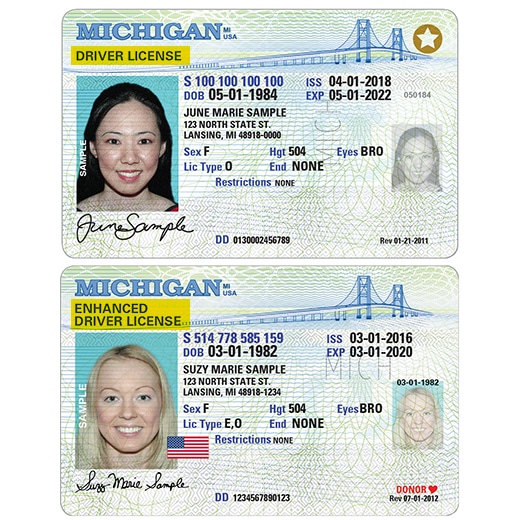
On the current Michigan license design, ISS appears in the lower portion of the card and shows the date the Secretary of State issued your current card. It's labeled ISS: the standard abbreviation for Issue Date used by most states.
Only 1% of California drivers answer all 3 correctly
Think you know the rules? Most licensed drivers miss at least one.
At 60 mph on a dry California freeway, what is the recommended minimum following distance?
ISS is not your date of birth and not your expiration date. It's the date your current physical card was printed. If you renewed your license, the new card has a new ISS date. Your license number stays the same, but ISS resets with each renewal.
Preparing for your DMV test?
Download our free iOS app — 1,164+ practice questions in 11 languages, flashcards, and offline study!

Michigan license types: Standard, REAL ID, and Enhanced
Michigan issues three types of driver's licenses, each with a different appearance and purpose:
- Standard Michigan driver's license: Works for driving and most everyday ID purposes. Not accepted for domestic flights or entering federal buildings after the May 7, 2025 REAL ID deadline.
- REAL ID-compliant license: Has a gold star in the upper right corner. Accepted for domestic air travel, federal facilities, and all standard ID uses. Requires additional documentation to obtain.
- Enhanced Driver's License (EDL): Has a U.S. flag design. Works as a passport alternative for land and sea travel between the U.S. and Canada, Mexico, and some Caribbean nations. Also REAL ID compliant. Useful for Michigan residents who frequently cross into Canada.
If your Michigan license doesn't have a gold star or a U.S. flag design, it's a Standard license. You can use it to drive but not for domestic air travel starting May 7, 2025.
What does DD mean on a Michigan driver's license?
DD stands for Document Discriminator, a serial number unique to each physical card. The DD changes every time a new card is printed, even if your license number stays the same. It's used by banks, car rental companies, and identity verification systems to confirm the card hasn't been altered or duplicated.
If a form asks for a "document number" as a separate field from your license number, it's usually asking for the DD. On Michigan licenses, it appears in small text near the bottom of the card.
What does RSTR mean on a Michigan driver's license?
RSTR stands for Restrictions. If the field shows None or is blank, your license has no restrictions. Common Michigan restriction codes:
- A: Corrective lenses required (glasses or contacts)
- B: Daylight driving only
- C: No expressway or freeway driving
- E: Automatic transmission only
- F: Left outside mirror required
- G: Speed restriction (specified in the field)
Driving in violation of a restriction is treated as driving without a proper license in Michigan. If you're unsure what a restriction code requires, the Michigan Secretary of State website lists all codes and their specific requirements.
Date fields on a Michigan driver's license
Michigan licenses print three date fields in similar locations, which makes them easy to confuse when reading quickly:
- ISS: Issue date. When your current card was printed and issued.
- DOB: Date of birth. Your birthdate, printed on the card for identity verification.
- EXP: Expiration date. Michigan driver's licenses are valid for 4 years for most drivers.
How to renew your Michigan driver's license
Michigan offers online renewal through the Secretary of State website (michigan.gov/sos) for eligible drivers. Standard license renewals can typically be done online if your address hasn't changed and you don't need to upgrade your license type. For a REAL ID, you must appear in person with documentation proving your identity, Social Security number, and Michigan residency.
Michigan also has "FAST" Secretary of State branches: these are smaller office locations with typically shorter wait times than full-service branches for routine renewals and transactions.
The renewal fee for a Michigan driver's license varies by license type and term. At renewal, you'll be asked whether you want to upgrade to a REAL ID if you don't already have one.
- ISS is the label for the issue date on your Michigan license. It shows when the SOS issued your current card.
- ISS is not your date of birth (DOB) and not your expiration date (EXP): enter the date next to ISS when a form asks for "license issue date."
- If you renewed your license, the ISS date on your current card reflects the renewal, not your original license date.
- The DD field (Document Discriminator) is a card serial number, not a date: do not enter it as an issue date.
How to find your original Michigan licensing date
If you need to know when you first became a licensed driver in Michigan (not just when your current card was issued), that information is in your official driving record. You can request a certified copy from the Michigan Secretary of State online, in person, or by mail. The record shows your original licensing date, renewal history, and any violations or points.
Common mistakes when entering your Michigan license issue date
- Use the date next to ISS when any form asks for your "license issue date" or "date issued"
- Check the date format the form expects: some want MM/DD/YYYY, others want YYYY-MM-DD
- If you have a renewed license, use the ISS date on your current card, not the date you first got a license
- Keep a photo of your license on your phone for quick reference when filling out online forms
- Renew your license before the EXP date: many employers and landlords reject a license within 60 days of expiry
- Update your address within 30 days of moving to keep your license record current
- Don't enter your DOB (date of birth) when a form asks for the issue date: they are completely different fields
- Don't enter your EXP (expiration date) as the issue date: expiration is when the license ends, not when it was issued
- Don't use the issue date from an old expired license if you have a current one
- Don't enter the DD (Document Discriminator) number as your issue date: it's a card serial number, not a date
- Don't guess the date if you can't read your license clearly: order a replacement to avoid entering incorrect information
- Don't assume the issue date is the same as your birthday: they are unrelated